
Starter
19.90 € / month, per business
- 1 WhatsApp number
- 1 user
- 2 000 AI replies per month
- up to 1 000 contacts
In ContactoIA, the team defines what the assistant can say about its services, the tone it uses and when it should call on a person. Test these decisions before connecting the company's number.
3 days free, with 100 AI replies in total, no card required · Plans from 19.90 €/month
The demos and the product app are in Portuguese.
A WhatsApp Business away message delivers a preset notice, such as the time a shop reopens. This is enough if you only need to acknowledge receipt. ContactoIA is for companies that receive different questions about services, prices or terms on the same number and want to follow what happens afterwards.
Imagine a florist receiving two messages. “How much is the bouquet in the catalogue?” has a price the team can verify. “How much would it cost to decorate ten tables on Saturday?” depends on the flowers, travel and availability. The second request should reach someone authorised to prepare a quote.
Try this with your own example. The brief further down lets you organise the decision here on the page. Then, in the ContactoIA lab, you can test how the assistant responds to the company's instructions.
Choose a service, its price and the delivery or booking terms. State who reviews this information and how the assistant should speak to the customer. An outdated price list also produces an outdated answer.
Ask about the advertised service, then request a discount or a deadline the company has never approved. In the second answer, look for a clarifying question or a handover to the team. Repeat the test using the informal way customers write.
In the lab, adjust the instructions and test again. Keep one question that should receive a price and another that requires a quote as reference examples. When the catalogue or rules change, repeat both.
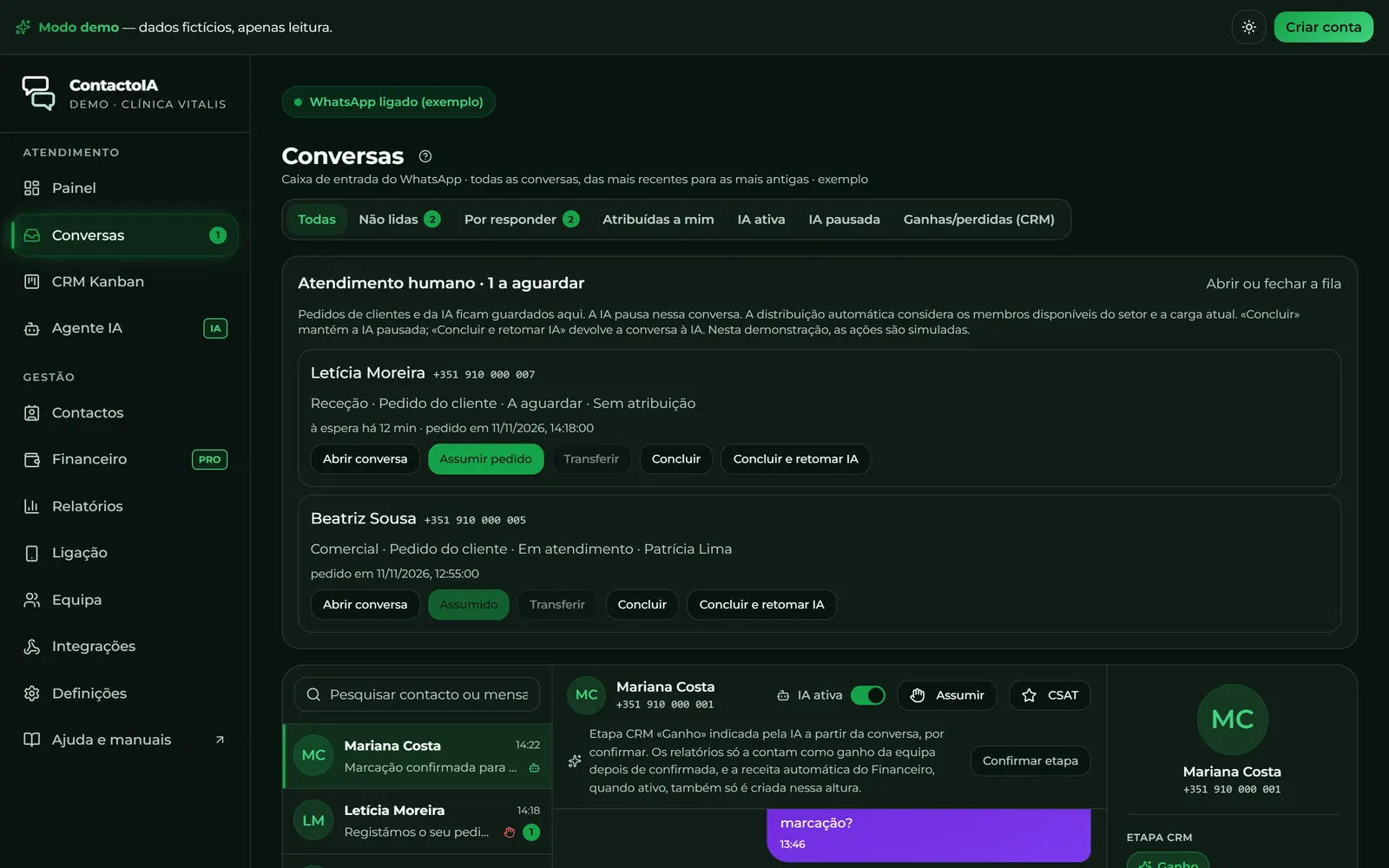
Open a demo conversation that is waiting for the team. The history lets the operator see what the customer asked and what the AI has already answered. Taking over the conversation pauses the assistant for that contact. A reply sent from the company's own phone also triggers this pause.
In the florist example, Inês handles the message and Rui prepares the quote for the ten tables. In the CRM, choose Rui as the opportunity owner and record what was agreed for the next contact. When Rui opens the record, he should find the task and deadline. To check whether the customer has already received the quote, consult the conversation.
If the quote is still being finalised, “Concluir” keeps the AI paused. Once the matter is resolved, “Concluir e retomar IA” allows automated customer service to resume. Test both states in the inbox.
Count team members, the contacts you want to store and the replies the AI would send separately. Two customers may exchange the same number of messages with the company but use different amounts if one is served by the team.
Fictional example: 65 conversations per day × 4 AI replies per conversation × 22 operating days give 5 720 replies in the month. For two people handling enquiries, Pro covers this estimate, with room for another 280 replies. If Christmas week changes the volume, recalculate using the busiest days. The contact limit refers to the total stored in the CRM.
All plans include conversations and CRM. Automatic bookings require Pro or Business, a valid Google Calendar connection and configured availability rules. The API and webhooks are available on Business.
A bicycle workshop has a price for a service, but needs to assess special requests. Change the example to try your business's rules and copy the brief to prepare the ContactoIA setup.
The three examples are generated by fixed rules on this page. There is no connection to WhatsApp or AI. Use only public company information, without customer data. The values are not sent or stored.
Enter the hours, service and team. For a published price, enter an amount of zero or more with up to two decimal places.
State the hours
Monday to Friday, 9:00 to 18:00
Opening hours do not confirm an available appointment slot.
State the published price
The price of the service “Bicycle service” is 45 €.
The amount applies only to the stated service.
Pass to the team
I will forward the request to the responsible team (Workshop).
Discounts and services outside the list require human confirmation.
Before activating customer service, take the rules to the ContactoIA lab and compare the assistant's answers with your company's policy.
Consult the help on testing answers in ContactoIAIf an hour of work costs 15 € and an automatic reply frees up 3 minutes, 27 requests of this type per month are enough to match the Starter plan's price in team time. Use your own measurements to compare.
To measure, choose repeated questions on the same subject and time the manual handling and the review of the automatic reply. Count the resolved requests. If each request uses several AI replies, count them separately to check the plan limit. The time freed up only reduces expenses if the actual operating cost changes.
Check plan limits and prices19.90 € / month, per business
34.90 € / month, per business
84.90 € / month, per business
The company scans a QR code on its phone to link ContactoIA as a WhatsApp device. The connection uses linked devices and is subject to WhatsApp's rules. Companies that require Meta's official API should consider this condition before subscribing.
It interprets voice notes and compatible audio messages and replies in text. If a request arrives in a photo, video or document, it can consider the accompanying text. Route cases that require examining the file to the team.
ContactoIA was developed to handle incoming conversations and sales follow-up. The CRM lets you record the next contact. Campaigns and bulk messaging are outside the product's features.
When the plan's limit is reached, the assistant stops sending automatic replies. During the active paid period, the team can continue manually. Replies left unused in one month do not carry over to the next.
The trial registration starts without a card. The monthly subscription is a separate decision, confirmed in PayPal. Without a subscription, the end of the trial stops automated customer service.
Steps, examples and worksheets to prepare the work in your business.
Choose according to the team’s work and connection method, without confusing products.
Avoid duplicate replies and forgotten requests with clear responsibility rules.
Connect the away message to the team’s actual capacity to respond.
Turn a scattered conversation into a request the team can assess and track.
A useful handover ends with a responsible person, context and no interference from automation.


Answers powered by artificial intelligence
You are talking to an artificial intelligence assistant, not a person. I answer questions about Lyntev, its services and prices, and prepare cost estimates. I can make mistakes, and these estimates are for guidance only: only the price in the order summary and Lyntev's written proposals are binding. Do not share sensitive data. The conversation is stored for 30 days and you can delete it whenever you wish. Learn more