
Básico
29 € / month, per clinic
- 1 healthcare professional
- reception included
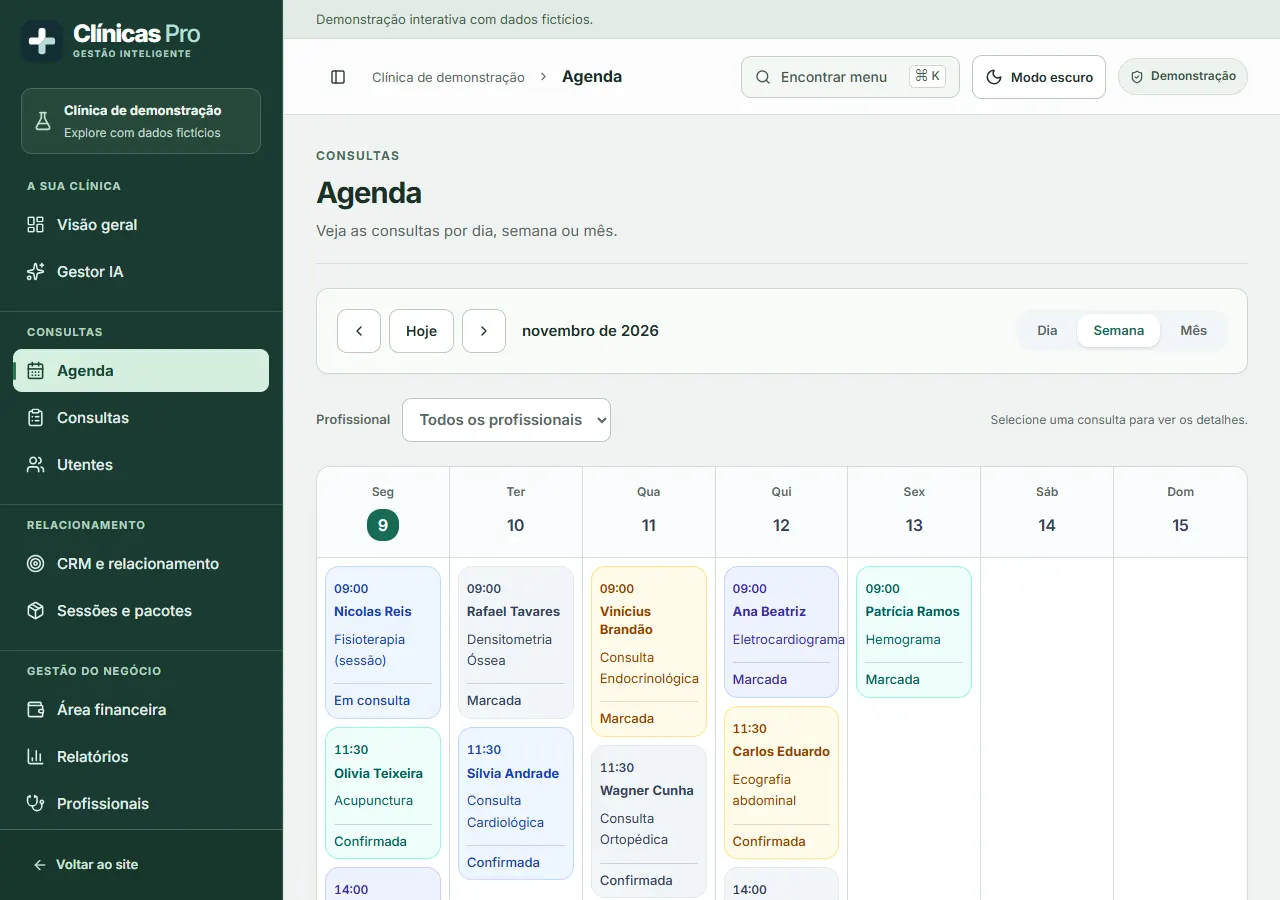
Do you work independently or share a practice with other healthcare professionals? In Clínicas Pro, you can book the consultation, reserve the room, follow up with the patient and check the payment received. Explore the calendar and see what changes when a receptionist or a second professional joins.
3 days free, no card required · Plans from 29 €/month
The demos and the product app are in Portuguese.
A doctor in private practice or a psychology, physiotherapy or nutrition professional can start with Básico. If someone else answers the phone or manages bookings, they can have their own system access as a receptionist without taking a healthcare professional place.
On Pro, each professional has their own calendar. Imagine two people want the same consulting room at 10 am. Check the existing booking, choose another room or suggest another time. When you return to the calendar, check that each consultation is linked to the right professional and room.
Ultra increases team capacity and includes Gestor IA. Management can, for example, analyse missed appointments and occupancy over a period. For external analyses, the service receives aggregate counts. Names and individual notes remain in the clinic.
Video consultations are included in all three plans. To understand both sides of the process, use a fictional booking with an email address of your own and open the patient's link on a second device.
In the calendar, choose the professional, time and online consultation option. Open the link the patient receives and check the stated joining time. The waiting room opens to the patient 15 minutes before the consultation.
The patient opens the link in a browser on their phone or computer. On the other device, sign in as the professional, check that you can see the person in the waiting room and admit them. Check the picture and sound.
The video is encrypted between participants and the call is not recorded. In the professional profile, complete the consultation record and check that the note you wrote is linked to the right booking.
Imagine a psychology patient calls to postpone a session. Reception needs to find the booking, reschedule it and communicate the new time. The clinical note from the previous session is only for professionals authorised to follow that patient.
During the trial, use a fictional patient. Sign in with a professional profile and write a test note. Sign in again with the reception profile and reschedule the session. Check that reception can manage the schedule and that the clinical note is inaccessible in that profile.
Assign an account to each team member and choose the profile that matches their duties. Before recording real patients, the person responsible for the clinic accepts the data processing agreement in the dashboard. You can read the full document before creating an account.
Count the people providing healthcare in that clinic. A doctor and a receptionist count as one healthcare professional. Video consultations are included in all plans. Each clinic has its own subscription, even if the person responsible manages several through the same account.
Enter the number of healthcare professionals as a whole number starting at 1.
For more than 10 healthcare professionals, Lyntev prepares a proposal for the clinic. The price is confirmed before you sign up.
Request a price for my team1 healthcare professional · reception included. Video consultations included.
Up to 5 healthcare professionals · unlimited team members. Video consultations included.
Up to 10 healthcare professionals · 500 AI credits per month. Video consultations included.
The subscription is monthly, renews automatically and has no joining fee or minimum commitment. The 12 months are for budget planning. You can cancel and keep access until the end of the period already paid for. Additional AI credits and SMS charged by the mobile provider cost extra if you use them.
Run a technical rehearsal with two team members, two devices and a fictional booking. Tick each result after observing it. The selections stay only on this page and disappear when you close it.
Ask two team members to use separate devices. In a test account, create a fictional booking for the same day using a team email address. Decide who opens the room and who represents the patient.
Reception explains how to join, who will be present and how to contact the clinic if the connection fails. The second person repeats the instructions in their own words. In a real consultation, the professional is responsible for explaining matters to the patient and confirming their agreement.
The second person opens the link on their phone close to the scheduled time. On another device, the professional checks the booking and confirms who is waiting before admitting them.
Use headphones or separate rooms. Check that both people can hear and see each other, that the framing is appropriate and that no third-party conversations or documents appear on screen. Carry out the rehearsal without recording.
The person representing the patient briefly disconnects from the network. Test rejoining and the previously agreed alternative contact method. If video remains unavailable, the team should know who informs the patient and how to reschedule or refer the matter to the professional.
Close the session on both devices. Check who can reschedule and who is responsible for the clinical record in a real consultation. Hand over to reception using only the fictional booking.
The rehearsal assesses the technical process. The decision to hold a video consultation and provide appropriate follow-up for each person rests with the healthcare professional.
29 € / month, per clinic
39 € / month, per clinic
69 € / month, per clinic
The monthly fee is per clinic. Count the people who provide healthcare to choose the plan. Reception, management and finance profiles have their own access without taking those places. If you manage several clinics, you can use the same account for all of them. Each clinic has its own subscription.
Yes. Online booking and video consultation are separate features. A patient can request an online booking for an in-person consultation. When the consultation is remote, select the online consultation option in the calendar.
Yes. A single professional can use the Básico plan to offer video consultations to patients they see in private practice. The consultation is booked in the practice's calendar, and each patient receives a link for their booking. You can first explore the process with a colleague in the video consultation test on this page.
The system prepares the WhatsApp message for the team to send. Automatic text messages, when configured, are sent from the clinic's phone. In the test, use your own contact details to check the time, text and link the patient receives.
The finance area lets you track expected amounts, payments received and expenses. To issue the invoice for the clinical service, use your clinic's certified invoicing software.
Steps, examples and worksheets to prepare the work in your business.
Reception confirms operations; clinical information and decisions go to the competent professional.
The system supports record-keeping; providing explanations and obtaining consent are the responsibility of the competent professional.
Test access before the appointment and agree how to ask for help if the connection fails.
Compare events and references before comparing totals alone.
Confirm the full set of resources required, including preparation and unavailability.
Close the request when the new arrangement is confirmed and dependencies have been reviewed.


Answers powered by artificial intelligence
You are talking to an artificial intelligence assistant, not a person. I answer questions about Lyntev, its services and prices, and prepare cost estimates. I can make mistakes, and these estimates are for guidance only: only the price in the order summary and Lyntev's written proposals are binding. Do not share sensitive data. The conversation is stored for 30 days and you can delete it whenever you wish. Learn more